A business management system helps when an inquiry becomes a quote, a scheduled job and eventually an invoice. The customer details and documents stay associated with the same work, so the office can see what has already happened. If you run a small team and everyone needs current records, that can be useful. If your existing apps already share information reliably, replacing them may offer little advantage.
What is a business management system?
It is software that organizes the core records and workflows used to run a business. A contractor might have customer inquiries, estimates, active projects, permits, suppliers, crew schedules and invoices. A bakery might track orders, register sales and inventory. A school has a very different set of records. The useful system is the one that reflects the business, not a generic checklist of features.
The home dashboard might show today's jobs and outstanding estimates. Opening a customer or project leads to its records, while staff access can be limited to the information needed for their role. The value is in the linked records rather than the size of the dashboard.
Follow one customer from inquiry to completed work
A remodeling company receives a request for a bathroom project. The inquiry includes the customer's name, location and requested work. After the estimate is approved, the same customer record connects to the project, its schedule, material selections and change orders. Invoices refer back to the job instead of living in a separate customer file.
Without those links, the office might copy the contact details into a spreadsheet, save a proposal separately, add dates to a calendar and look up the invoice somewhere else. None of those tools is inherently bad. The extra effort appears when someone needs to confirm which version is current or what action comes next.
The project record is the place to check a change order, confirm an upcoming task or find an earlier invoice. People still prepare estimates and work with the client, but they can use the same information.
One connected system or several good apps?
Separate applications are a reasonable choice when each has a clear role and the handoffs are simple. A calendar, bookkeeping program and small customer database may be enough for a solo professional. Connected software becomes more valuable when the same customer and job information must be entered repeatedly or a growing team needs to see one shared status.
Before replacing existing tools, identify the specific duplication. Is it a customer address copied three times? A job status that never reaches billing? A staff handoff that requires an email someone might miss? The answer tells you what a system should connect and what can stay where it is.
Depending on the system, you may be able to replace a separate intake form, booking app, customer spreadsheet, quote template, or basic invoicing tool. If a tool already does its job well, check whether connecting it would give your team the same benefit with less change.
What the owner should see in the morning
A useful home screen answers practical questions: what is scheduled today, which jobs need attention, what has been quoted, what is waiting for approval and which invoices need review. The exact questions vary by industry. A landscaper may need route and crew information; a school director may need attendance and parent communications; a salon owner may need bookings and the front desk.
Intake, appointments and payments in one view
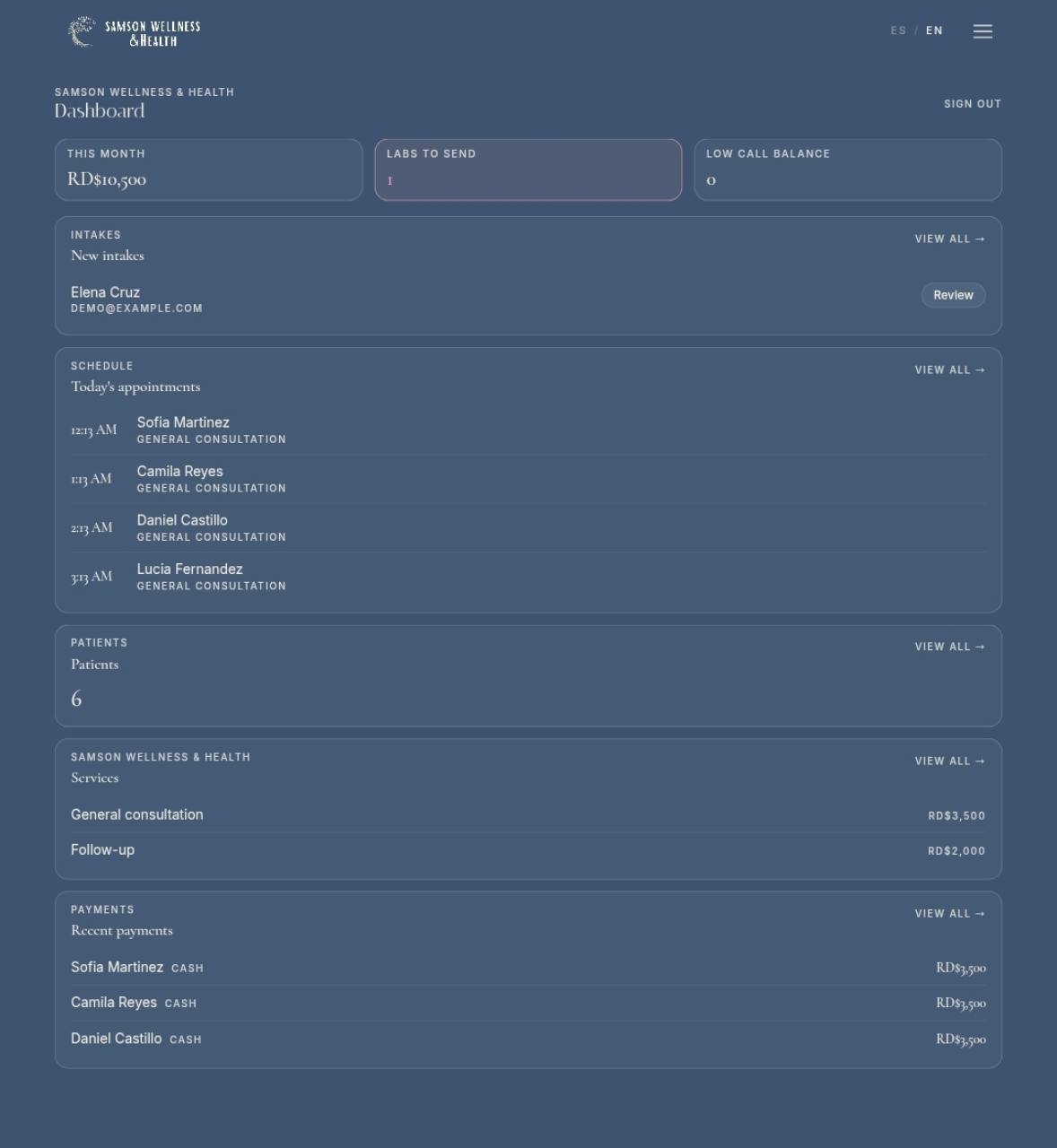
The Samson Wellness CIRA dashboard shows new intakes, upcoming appointments, and recent payments. The practice team can check what needs attention from the same screen.
When is the move worth considering?
- People repeatedly enter the same information in more than one place.
- Several people need current access to job, customer or appointment records.
- A step such as approval, billing or follow-up depends on the previous one.
- You need a reliable view of upcoming work, open requests and unfinished tasks.
- The current tools are sound individually, but the handoffs are becoming difficult to maintain.
Equally important: a good system should make data access, permissions and exports understandable. Ask who controls the business records, what happens when the subscription ends and whether the team can do ordinary work from a phone.
When not to replace what you use
Keep the current setup if the business runs smoothly, everyone knows where the records live and the cost of maintaining a new system outweighs the benefit. Sometimes the right next step is one automation between two trusted tools, not an entirely new platform. Software should support the way a company operates instead of forcing a more complicated process.
Before purchasing a system, identify the records your team searches for most often. Then check how each prospective platform connects them. You can compare approaches on our Platforms page.